Sunday, November 5, 2017

Experience as a Musician

Savannah

Fortunately in my major I get immediate hands on experience in my field. Especially being in a freshman voice class of only 15, there’s plenty of opportunities. One of the newest experiences I have gained as a vocalist is working gigs. Specifically working in a church choir.

Plenty of voice majors, performance or education, are paid to be section leaders in different church choirs on or close to campus. As section leaders, students attend rehearsals and services throughout the school year and are expected to learn their music thoroughly enough to be able to help the rest of the section learn their part and provide the proper harmonies. This year I started as the alto section leader at one of the local churches.

At first I didn’t know what to expect. I had feared that I was in over my head, or that it would be far too intense for me. While that could still be true of certain churches, I have been pleasantly surprised at my experience working in a church choir.

Every Thursday at 7:30, rehearsals start with the whole choir. At my first rehearsal I was given several choral arrangements of pieces, along with the program for that Sunday’s service which included the hymns we would be singing, and the psalm of the week. It was mainly sight-reading—looking at the sheet music for the first time and singing it without preparation—but it was nothing too anxiety-inducing. I then rehearsed the music outside of church rehearsal in preparation for that Sunday.

At every service someone solos for the psalm and is also the "song leader," meaning they sing the hymns into a microphone so the congregation can sing along to the melody without being confused by the harmonies from the choir. For my first time as a song leader I prepared meticulously to be certain that I performed to the best of my ability.

Unfortunately, sometimes musicians are not always given ample time to prepare. For example, just today (Sunday) the song leader lost her voice the night previous and I was needed to substitute for the day. I had not reviewed the soloist's part of the psalm and had not learned the melody of the hymns, since I typically sing the harmonies. This served as a great example of inconvenient scenarios that I could be subject to in my career as a musician.

Having a church job—and having to be an emergency substitute—gave me a new level of understanding. I now know what it's like to have to perform with little to no preparation. This experience will help me continue to grow as a musician well into the future.

Writing this article helped me realize that being a musician is so unique. You begin making connections, networking, and performing semi-professionally from the moment you get on campus. It really stresses the importance of being able to present myself professionally and network for new opportunities.

It's Ancient History!

Matthew Zang
Ancient History
   We've all heard someone in our lives say, "Forget about it! It's ancient history!". But what really is ancient history? According to that person in your life, it's the thing that your Uncle Larry did two days ago, however, to historians, it's something completely different.
Photo Courtesy of  arts.auckland.ac.nz
 
   Ancient History is not the oldest period classified by historians. That honor is bestowed upon the era of Prehistory. What most people think of as Ancient History is actually the period denoted as Classical Antiquity, which began with the earliest known documents of Greek history in 776 BC. The ending of this period is not strictly defined by historians and while some will use the Fall of Rome in 476 AD, others will use the death of Emperor Justinian I in 565 AD. This was a period of rapid growth and relative stability for many around the world and because of this, many records of daily life were created and many survived to the present day.
Photo Courtesy of  www.ncl.ac.uk
 
    One of the reasons why historians find it so hard to classify the end of this period is because of how large in scope it is. If you take the Colonial Era for example, you can say that it started in the 1400's and ceded to Imperialism in the late 1800's. This is possible because the peoples doing the colonizing were generally from one area, Europe in particular. This is not the case with Ancient History because it involves major powers that did not interact often in areas such as the Mediterranean, India, China, and the Middle East. Marking one event from one of these areas to signify the end in all of them because a horribly touchy subject with historians.

   So in conclusion, Ancient History has a very vague beginning and end but the contents of those years are rich with stories and legends that have survived the test of time!


Works Cited:
http://www.digitalhistory.uh.edu/era.cfm?eraid=2
http://www.bbc.co.uk/history/ancient/
United Center for Research and Training in History. (1973). Bulgarian Historical Review. Sofia: Pub. House of the Bulgarian Academy of Sciences

How to Build a Computer: A Step by Step Guide


The Basic of Computer Building 
  
Pre Build
Anti-Static Arm Strap - This is designed to safeguard components from static charge. The probability of your components getting shocked is small, but we shall not take the risk. 

Screwdrivers: Make sure that you have variety of screwdrivers available.
 Zip ties- You will want a bunch a zip ties as they will proved for better cable management, and help your computer look clean.

Preparing the Case 
  To get inside the case you’ll need to first remove the side panels. Some cases will use thumbscrews so this will be easy, otherwise grab your crosshead screwdriver to remove the screws. After this, lay the case on its side as it will provide you with a better idea as to how much space you have in the case. 

Power Supply 
Make sure the power supply (PSU) fan in facing down.   The PSU will draw in cool air from outside the case, allowing it to maintain a lower operating temperature and potentially expanding its lifespan.
With the PSU in place, make sure the screw holes match up with case.  Now it’s a simple matter of attaching the four screws to hold the PSU in place.

Motherboard/CPU
The port surround plate (often called the back plate) fits into the back of your case and gives you access to the ports on the motherboard, typically with pre-cut holes. Occasionally motherboard manufacturers will use generic plates that fit all of their motherboards, so you might need to remove specific port covers in order to match the actual connections available.
The easiest thing to do is to hold up the plate to your motherboard’s back connections to see which of them match, and then remove the ones you need. This could mean either twisting metal covers off, much like the expansion card blanking plates on the case, or it could require you to push a flap cover inwards to give access to the hole.

Installing the motherboard
Take the motherboard and do a test fit by putting in the motherboard in case and seeing which screw holes fit for your motherboard. Next, locate the screws that will be needed to install the motherboard in the case, and screw the motherboard in. Make sure that the motherboard is not bending while in the case. 

CPU
Installing a CPU differs from AMD to Intel. In our case we will be installing Intel Pentium.                   
To access the socket, you’ll need to unclip the handle that runs down the side of the socket. Lift this up to release the retaining clip on the main cage. Now lift the main cage up and out of the way to expose the socket. The pins for an Intel motherboard are on the board itself, so be sure not to damage these as bending them will stop the motherboard communicating with or powering the processor properly.

Now line up the two cutout notches on the sides of the processor with the ridges in the socket. An arrow on the processor should line up with the corner of the socket that has a missing pin. The processor should drop gently into place and sit flush with the socket. If it doesn’t, and there’s some lateral movement, the processor is in the wrong way. Carefully lift it up and align again. NO FORCE SHOULD BE REQUIRED AT THIS PROCESS. Give it a little wiggle to make sure that the CPU fits in correctly. Close the metal cage and pull the retaining handle down. This will required little force. 
The standard heatsink for Intel comes with four feet that will fit into the holes surrounding the motherboard’s CPU socket.  Line up the feet with the holes and start pressing them in a diagonal pattern. These should click into place so you will know they are secure. 

RAM
Instilling RAM is relatively easy. Start by releasing the notches in the motherboard RAM slot. Next, locate the notches on the RAM itself, match these up to make sure you’re inserting the memory module the right way round. Once everything is lined up, press the memory into the slot by applying even pressure on each end of the RAM stick. 

Video Card (GPU)
Remove the back plate by unscrewing the screw.

The GPU is a very delicate component. When instilling the GPU be sure to handle it very carefully by grabbing it by the heatsink. The first part in installing a GPU is figuring out what PCI-E slot your card fits in. Since our motherboard has only one expansion, this will not be hard to do so. The producer for instilling the GPU is similar when compared to the RAM. -Line up the notches and ridges between the card and the slot, apply some downward force to securely fit the GPU in place.  When the GPU is in place, screw back the back plate, by screwing it in. 

Powering the Components 
 In the PSU, look for the wire labeled CPU, and fit it into the slot located near the CPU. You CPU is now powered. Next locate the 20+4 pin connector, and fit it into the 20+4 slot in the motherboard.
Take out the SATA data cable and plug on end into the SSD, and the other end to the motherboard slot labeled SATA 2. To power on the SSD take the wire labeled SATA from the PSU, and plug it into the SSD. 
 Fans

Take the CPU fan wire and plug it into the CPU fan header in the motherboard. Take the wire that comes out of the fan in the back of the case, and plug it into the SYSFAN 2 header on the motherboard. 

Preconceptions about History (Prompt 1)

Matthew Zang
Preconceptions about History as a Field
    As I have stated in previous articles, many people look upon the field of History with confusion as to how it is actually useful. I created a list of what I thought Academic Historians do which is listed below:

  • Historians mostly work in archives and libraries
    Photo Courtesy of www.paperrecycles.org
  • Writing a paper takes careful planning and an outline
  • Historians will nitpick others' arguments
  • Research is a long and arduous process
  • A thesis is just a historical question that is answered in a paper

   To test these preconceptions about the field, I looked into Mary Rampolla's "A Pocket Guide to Writing in History". I found that quite a bit of work is done in archives but that is mostly the initial phase of the research. First you have to find the source but the larger question of analysis is done wherever one feels most comfortable! Most historians do in fact write an outline before the start a paper or book but not all do. Some just go through numerous drafts to refine what they would like they say. Historians do nitpick each other's arguments but this is done to get at the core of the issue at hand. Depending on how obscure the research is, it can be a difficult task. However, with the advent of digital archives, one doesn't have to search all over the world if they need a certain document. Again, the analysis is what takes up most of the historian's time. The most interesting thing I found though was that a thesis is not just a question. It must be argumentative so that other people reading the thesis can disagree and possibly disprove it.


Rampolla, Mary Lynn. A Pocket Guide to Writing in History. Boston: Bedford/St Martins, 2015.

Sunday, October 29, 2017

Endless Auditions


Savannah
As a performer, life consists of a whole lot of auditioning. Performers get up ready to face an audition day through their own special routines, typically doing something to calm themselves down and keep nerves at bay. Sure, we get ready, warm up, rehearse, show up to the audition… but then what? Here are some different audition processes for different major Opera companies.

The Metropolitan Opera

The Metropolitan Opera was founded in 1883. They have always prided themselves on showcasing the world’s most important artists, whether that be singers, conductors, composers, musicians, stage directors, designers, visual artists, choreographers, or dancers.

The Met requests that performers auditioning for a role in the opera chorus must first submit a cover letter requesting an audition. They have to give their first, second, and third prefered audition session times, and must also include if they are affiliated with a union. Those wishing to audition must also include a one-page resume, and a headshot, along with an MP3 of an operatic aria and a list of five or less operatic arias. From that list of arias, two will be chosen as audition pieces.

For principal roles, singers must be invited to auditions. They must be represented by “professional artist management or under very special circumstances.” The Met is allowed to decline to hear applicants without any explanation.

The Kansas City Lyric Opera

The Lyric Opera was founded in 1958, and according to their site, “brings high quality live operatic performances to the people of the Kansas City area and five-state region at the state-of-the-art Kauffman Center for the Performing Arts.”

Auditions are by appointment only, whether they are through management or by the individual. There are annual auditions in New York City in early December for principal roles in the operas for the following year.Resumes and requests must be emailed in for consideration.

The Royal Opera House

The Royal Opera House in London is, according to their website, “one of the world’s most leading pera companies… renowned both for its outstanding performances of traditional opera and for commissioning new works by today’s leading opera composers….”

A program called the Jette Parker Young Artists Programme is “intended to benefit extremely gifted individuals at the start of their professional careers. Singers… are expected to have some performance experience and to have completed training at an established music college (although this is not an essential requirement.)” There is technically now upper or lower age limit for the program.

Through writing this article I realized how different auditions can be and how detailed processes are. I didn't know that certain operas (like the Met), hold auditions for lead roles by invitation only. It really helps me understand that all auditions are different in some way and how important it is to be extremely prepared for whatever an audition may consist of.

What Do They Mean?


Laxmi Baral 

Few weeks ago, we looked at the engineering process and how it relates to computer building, this week we will look at what each of the components mean. 


CPU:  The CPU (Central Processing Unit), is the “brain” of the computer system.  The CPU is responsible for executing a sequence of stored instructions called a program.  

Clock Speed 

CPU clock speed, or clock rate, is measured in Hertz, generally in gigahertz, or GHz. A CPU's clock speed rate is a measure of how many clock cycles a CPU can perform per second. A CPU that processes one instruction per second will have a clock speed of 1 Hz (Hertz). Hertz is defined as cycle per seconds.
Cache 
The CPU cache is memory stored in the CPU.  The advantage of this is that date stored in the cache can be accessed very fast, but is limited to its capacity. 

Specs for the Intel Pentium G358
The Pentium has a clock speed of 3.2 GHz (Gigahertz), so therefore this processor will be able to process 3.2 billion instructions per second. 
    The Pentium has a cache of 4 MB, so there for 4 MB of data stored in the cache will be will be accessed very fast, but the data stored there can’t be more than 4 MB. 
  
Random Access Memory (RAM)
RAM stands for random access memory.  It refers to memory that the microprocessor can read from and write to. When you create something in memory, it’s saved in the RAM. 
So the more RAM you have, the better your computer will run. You can think of RAM as the computer’s thinking space, the more thinking space you have, the more you can think. 

SSD                          

SSD stands for solid state drive. Compared to regular hard drive, solid state drive provide faster read/write speed. The write speed is how long it takes to save something on to the drive, the read speed is how long it takes to read something from the drive so, how long it takes to open a file that’s stored on the drive. 

The SSD that is going to be in this computer will have a read/write speed of 540 MB/s. Therefore you can save and open data from this SSD at a rate of 540 megabits per second. 


Cache, RAM, and SSD are all form of storage.  While the CPU’s cache provides fast speed, the capacity of the cache is limited, due to how small the CPU is. RAM is the computer’s thinking space, and the SSD is how much the computer can remember or save. 

     
 Power Supply
A computer power supply takes in 120 volts of alternating current (AC) from the wall outlet, and converts it into different amount of directing current (DC), to supply sufficient power to the components in the system. 


Sunday, October 22, 2017

Musical Notation


Savannah

Musical notation can be defined as a system used to visually represent music. Through the ages, there have been many different ways of portraying music in a way that we could see. Here are some basic musical notations and their meanings.

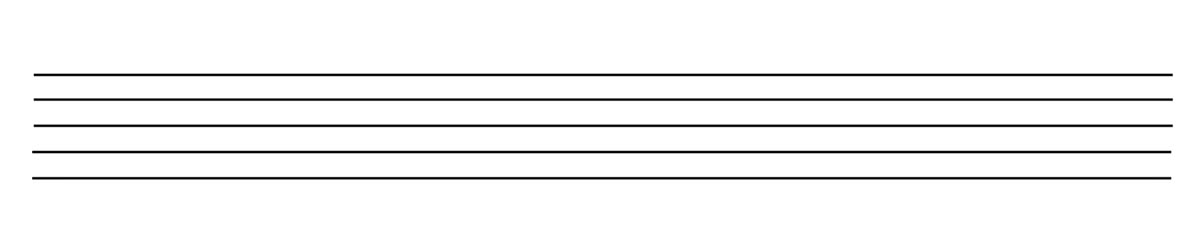
You start with a staff, that’s the lines that the music notes go on. Each line or space on the staff corresponds to a different note, which depends on what clef the music is in.
A musical staff
Treble clef, C clef, and bass clef

There are three kinds of clefs. Treble clef, where the bottom line of the staff is an F; bass clef, where the bottom line is a G; and C clef. C clefs—also known as alto clefs—are not used frequently and it can vary in which notes go where. The center of the symbol for a C clef is always on whatever middle C is on that staff.


When looking at music, the lines interrupting the staff vertically are called bar lines. They split the music up into measures.
Bar lines separating the measures
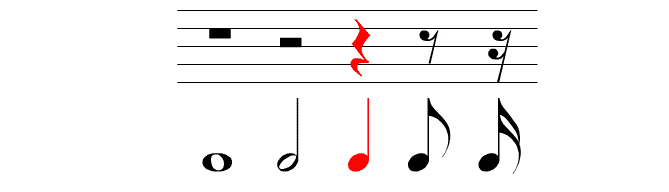
Different notes are held for different amounts of time and often that time depends on the key signature. What is certain is how they relate to one another. For example, a whole note is as long as two half notes, and two half notes are as long as two quarter notes, from there it’s broken down into eighths, sixteenths, thirty-seconds, and so on.
Note duration chart

Rests and their relation to notes
There are also rests when there’s supposed to be silence. They are notated differently than the notes, but they have corresponding durations. A whole rest is the same duration of a whole note, just silent. Same with half notes versus half rests, quarter notes and quarter rests, and so on and so forth.

Notation for different accidentals
More on notes: sometimes the pitches of notes need to be modified and that’s done using accidentals. These are sharps, flats, and natural signs. Sharps raise the pitch a half step, flats lower the pitch a half step. Natural signs make sure the note is played without a sharp or a flat. If there’s a natural sign instead of a sharp, the natural lowers the pitch a half step. If there’s a natural sign instead of a flat, it raises the pitch a half step.

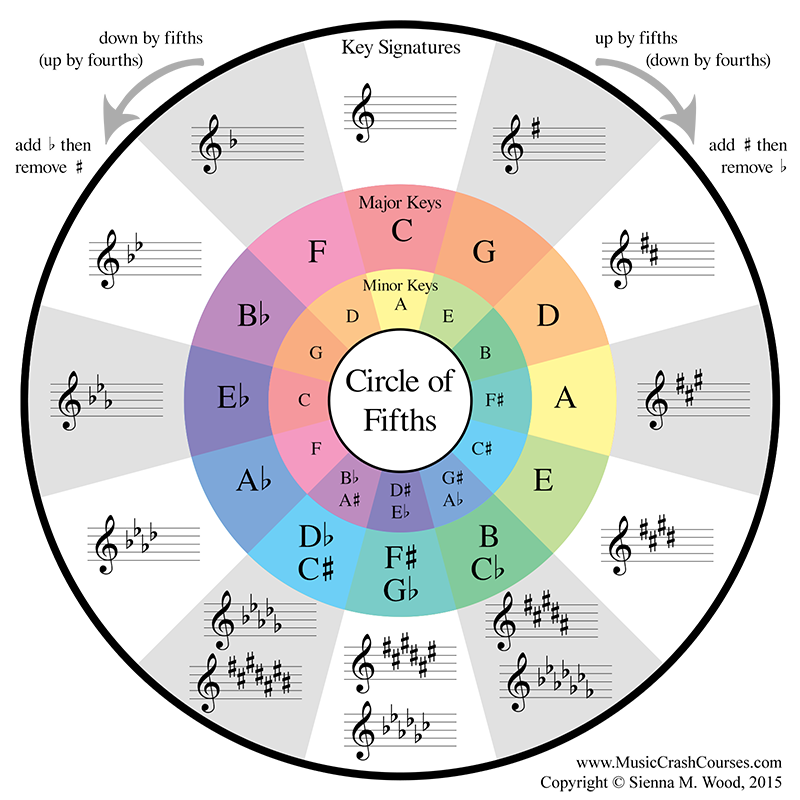
Music uses key signatures to give songs a specific key. Key signatures are a way to add accidentals to the music without having to notate them with a sharp or a flat every time they occur. The key of C Major has no sharps or flats, and is often represented with a large C. Key signatures are written before the clef on the staff.
The circle of fifths represents the key signatures of major and minor scales
Examples of time signatures

After the clef goes the time signature. Time signatures consist of two numbers, one on top of the other. The top number represents how many beats are in a measure. The bottom number says which note gets the beat. In 4/4 time, there are four beats in a measure and the quarter note gets the beat. Meanwhile in 6/8, there are six beats in a measure and the eighth note gets the beat. These are just two examples of many time signatures.


Musical notation takes awhile to learn, and is easiest to learn through experience. Even what has been put in this post barely even scratches the surface of all of the musical notation that’s out there. This type of communication that musicians use is fascinating, and definitely worth checking out.

While writing this I realized how difficult it is to describe musical notation. I thought that, since it’s something I work with everyday, it wouldn’t be hard to try and teach. That wasn’t the case at all. I noted that musical notation is more complex than it seems.

Wrapping Up

Laxmi, Matt, & Savannah Throughout the course of writing these blog posts, we have realized that although our majors vary vastly ...